

Every Outlook user is aware of OST files. These data files stand for Offline Storage Tables. Their role is crucial in ensuring the smooth running of the email client. Ever wonder how OST is created. This data file is created automatically. It is generated when the user adds an Exchange, Office 365, or Outlook.com account and use Cached Exchange Mode. This data file provides mailbox access to the users even without Internet. The user can read, compose and organize email messages. The modifications done will be synced with the restoration of the network.
Importance of Exchange Server for OST:
Exchange server is of paramount importance for .ost file. It acts as a central data source. This is so because the Exchange holds the master copy of user’s data. OST depends on Exchange for continuous data synchronization. In the absence of server, the user can’t receive new email messages. The user is also unable to send fresh emails. He can only access the folders already available in the data file (.ost). When that connection is lost, the OST becomes orphaned and unusable. Manual functionalities may fail to open it. This scenario requires conversion of the orphaned OST to PST.
It may be noted that Microsoft doesn’t provide any tool to directly perform such conversion. Additionally, the email client lacks functionality to perform such conversion without server access. In such a case, the user has to rely on some OST to PST converter software. These are specialized software that are developed to read even an orphaned or inaccessible data files (.ost) directly. They can read such files without Exchange connectivity. This blog titled “How to Convert OST to PST Without Exchange Server” will shed more light on the subject.
Understanding an Orphaned OST File:
Let’s understand this term in simple words. Every Outlook user is aware of the fact that .ost files are linked with a particular profile. They interact with the Exchange server. In case, this data file is detached from the live server, it becomes “orphaned”. It hinders normal functioning of the email client. The sync between the server and the data file (.ost) stops. The file is not getting updated.
Major Causes of Orphaned OST Files:
- Accidental deletion of an account from the server
- Loss of network for a longer duration of time
- Power failures when the Outlook is active
- Malware attacks
- Corrupt Outlook profile
- File system errors
- File corruption owing to power failure, system crashes and other reasons
How to Convert OST to PST When the Exchange Server is Partially Available:
Before starting any process, first take the backup. Always follow this golden rule. When the Exchange Server is available (fully or partially) then we can utilize some built-in functionalities. Check the below guide:
Conversion by Utilizing the Import/Export Feature: We can use this functionality. But it will work when the Exchange Server is available. Follow the below instructions:
- Access the File
- Then go to Open & Export
- After this click Import/Export option
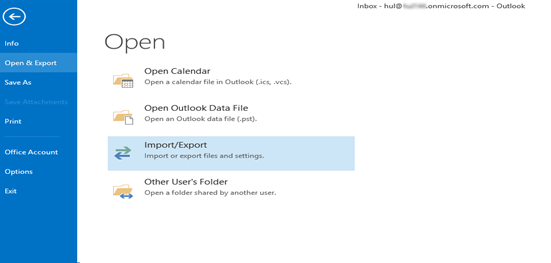
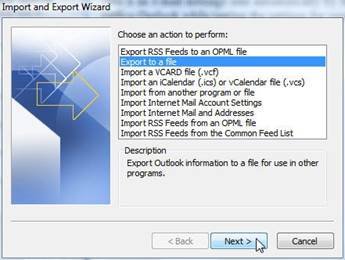
- At this stage, the functionality will ask to choose an action
- Select Export to a file
- Click Next
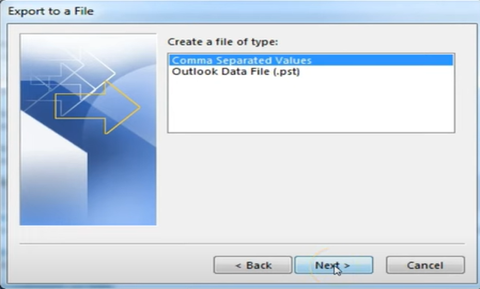
- From the dropdown, choose ‘Outlook Data File (.pst).’
- Then click ‘Next’.
- Now the user needs to select email message folders.
- Check the Include Subfolders option as well. Then hit Next.
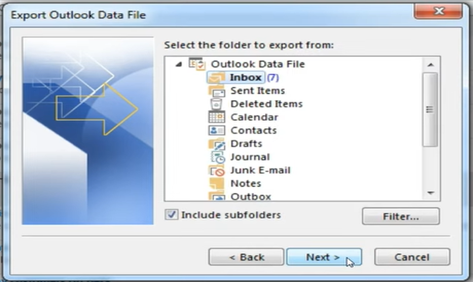
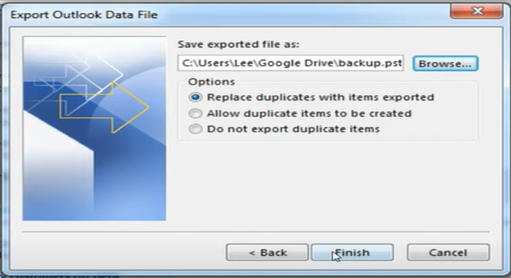
- Now provide the file location. Also check “Replace duplicate ….exported.”
- Click Next.
How to Open an Orphaned OST?
An orphaned OST can’t be directly opened. The heavy encryption and other security features prevent the user from performing this action. The user first requires to convert an orphaned OST to PST. Manual functionalities available within the Outlook may fail for sure. Only advanced software like Stellar Converter for OST will work here. Such conversion (using a specialized tool) is the safest way to access data without the original server/profile.
How the Converter Tool Works?
These are specialized tools that are developed to work without Exchange Server. They are capable of directly reading and parsing the OST. Tools like Stellar Converter for OST treat the file as a standalone data source. Their functioning bypass the need of live Exchange Server. Let’s understand their working step-by-step:
- At first, OST to PST converter tools scan the structure of the data file
- The second stage is previewing mailbox data (email messages, contacts, etc.)
- In the final stage, they convert the data file (.ost) to a working PST or other formats (PDF, EML, MSG, etc)
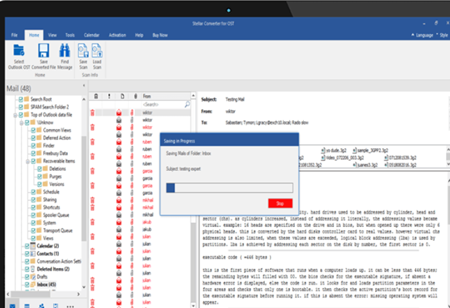
How Stellar Works?
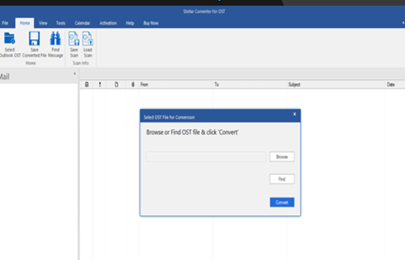
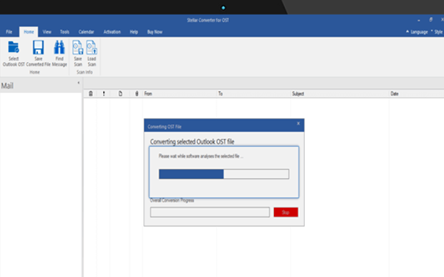
This converter tool performs the conversion in just 3 steps:
Step 1: Select the targeted OST
Step 2: Convert the data file
Step 3: Save the converted file to PST or other format
Benefits of Stellar Converter for OST:
Some advantages of this converter tool are mentioned below:
- Self-sufficient to read the Offline Data File (OST) structure (Without Exchange Server)
- Ability to understand the exclusive format of an OST file
- Capability to extract attachments from an inaccessible OST
- Ability to recover folders from an orphaned data file
- Ability to handle oversized data files
Conclusion:
The above guide narrates “Can You Convert OST to PST Without Exchange Server? Here’s How.” We came to know that the data file (.ost) is dependent on the Exchange Server for authentication. If the connection is lost then it becomes unusable and orphaned. The above guide offers practical solutions to convert an orphaned OST to PST. It also covers the challenges involved in the conversion process. Even though there are built-in functionalities, but they fail in case of an orphaned OST. In such a case, the best and the most reliable way is to employ some OST to PST converter tool. Such software can directly read and parse the offline Outlook Data (.OST) file. Experts recommend tools like Stellar Converter for OST. With advanced capabilities, such tools can independently read the Offline Data File (OST) structure. Their friendly interface promises easy selection, preview as well as conversion.

